
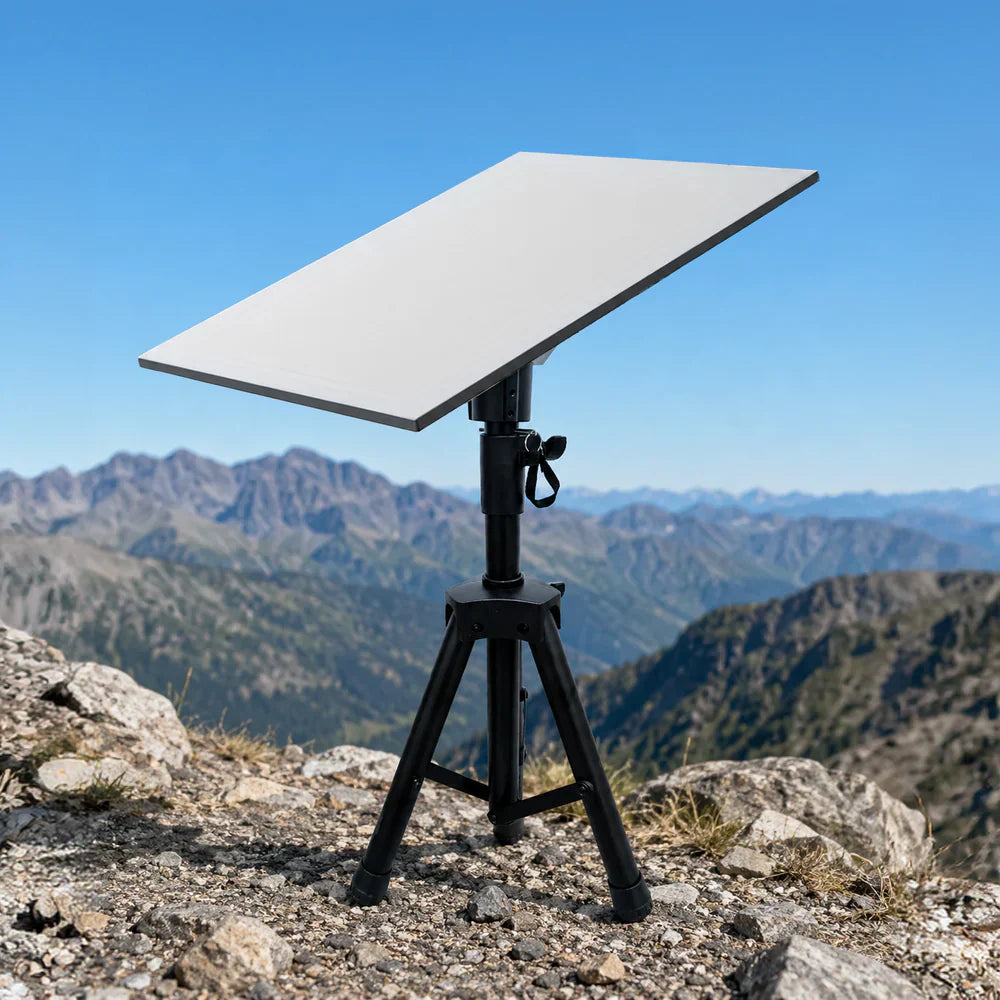
Fast internet used to mean staying put. Now it means finding a patch of ground, unfolding three legs, and getting back to whatever brought you out there in the first place.
Whether you're working from a campsite, running a temporary field operation, or parked somewhere so remote your phone gave up an hour ago, a portable Starlink setup changes what's possible. And with the right tripod mount, the whole thing takes less time than making a coffee.
Here's exactly how to do it, plus a few tricks to keep your dish steady when the weather has other plans.
Why a Tripod Mount Is the Best Portable Starlink Solution?
Starlink's Gen 3 / Gen 4 dish is impressively capable, but the kickstand it ships with was designed for flat, forgiving surfaces. Real terrain rarely cooperates. Campsites slope. Worksites are rocky. Beaches shift.
A purpose-built tripod mount solves this with three independently adjustable legs that let you level the dish on almost any surface — gravel, grass, sand, or uneven rock. The Mighty Mount Adjustable Tripod Mount is built specifically for the Gen 3 / Gen 4 dish, with a tool-free design, an adjustable height range of 23" to 46", and a folding frame that packs into an included carrying bag.
No drilling. No hardware. No permanent commitment. Just internet, wherever you are.

What You'll Need
- Your Starlink Gen 3 / Gen 4 dish and router
- The Mighty Mount Adjustable Tripod Mount
- A power source (mains, generator, or portable power station)
- Optional: ground stakes or ballast for windy conditions
That's the whole list. The tripod requires no tools for setup or teardown.
The Two-Minute Setup, Step by Step
Step 1: Pick your spot (30 seconds). Starlink needs a clear view of the sky — ideally with no trees, buildings, or cliff faces blocking the northern sky (or southern sky if you're in the Southern Hemisphere). Open the Starlink app and use the obstruction checker if you're unsure. A few extra metres of walking now saves hours of dropouts later.
Step 2: Unfold and level the tripod (45 seconds). Open the three legs and set the tripod down. On uneven ground, adjust each leg independently until the mount head sits level. This is where the tripod earns its keep — what would be a wobbly compromise with the standard kickstand becomes a rock-solid base in seconds.
Step 3: Attach the dish (20 seconds). Slot your Gen 3 / Gen 4 dish onto the mount head. The fit is purpose-designed for this dish generation, so it seats securely without adapters or guesswork.
Step 4: Route the cable and power up (25 seconds). Run the cable down along a tripod leg so it's not a trip hazard, connect to your router and power source, and let the dish find its satellites. Most connections establish within a couple of minutes of powering on.
That's it. You're online.

Pro Tips for a Rock-Solid Portable Setup
Stake it down in wind. The tripod is stable on its own, but in exposed or high-wind environments, secure the legs with ground stakes or hang ballast (a filled water bottle or gear bag works) from the centre. Ten seconds of insurance against a toppled dish.
Go higher when you can. Extending the legs toward the full 46" height helps the dish clear low scrub, vehicle roofs, and tent lines that might otherwise nibble at your signal.
Protect your power connection. If rain is possible, keep your router and power connections under cover — a vehicle boot, awning, or dry box. The dish itself is built for weather; your power strip isn't.
Pack it in reverse. Teardown is just as fast: unplug, lift the dish off, fold the legs, and slide everything into the carrying bag. You'll be packed before the kettle boils.
Don't Forget the Drive: Getting There Is Half the Setup
Here's the part most portable Starlink guides skip — the hours you spend getting to that remote spot.
Off-grid destinations usually mean long drives on unfamiliar roads, with your phone doing constant navigation duty. A phone sliding around the passenger seat or wedged into a cup holder isn't just annoying — it's a genuine safety problem on rough roads.
Mighty Mount started with exactly this problem. Alongside its Starlink range, Mighty Mount builds a full lineup of heavy-duty car phone mounts — MagSafe magnetic mounts, vent and dash mounts, and auto-grip wireless charging mounts — engineered with the same philosophy as the tripod: secure hold, fast setup, built for rough conditions.
For remote-destination drivers, two picks stand out:
- The MagSafe Vent Mount — high-grade neodymium magnets keep your phone locked in place through corrugations, potholes, and gravel roads, with a 360° head for the perfect navigation angle.
- The AutoScan Wireless Charging Mount — auto-grips your phone and fast-charges it at 15W while you drive, so you arrive at camp with a full battery instead of a dead one.
Your dish keeps you connected once you arrive. A proper car mount keeps you safe and charged on the way there. Together, they're the complete off-grid connectivity kit.
Frequently Asked Questions
Does the tripod mount work with older Starlink dishes? No — the Gen 3 / Gen 4 dish has a different form factor from Gen 1 and Gen 2, so this mount is designed specifically for Gen 3 / Gen 4 hardware.
Is it stable enough for extended stays? Yes. For multi-day or semi-permanent deployments, stake the legs or add ballast and it will hold position through typical weather. For genuinely permanent installations, consider a roof mount instead.
How portable is it really? The tripod folds flat and comes with a carrying bag, making it easy to store in a boot, truck bed, caravan locker, or gear crate.
Can I use it at home as well as on the road? Absolutely. Many owners use the tripod as their everyday mount at home and simply pack it up when it's time to travel — one mount, every scenario.
Ready to Take Your Internet Anywhere?
The best portable tech is the kind you stop thinking about. Set up in under two minutes, tear down even faster, and stay connected everywhere in between.
Shop the Mighty Mount Adjustable Tripod Mount →
And before your next road trip, grab a car phone mount to match — because the journey deserves the same reliability as the destination.