
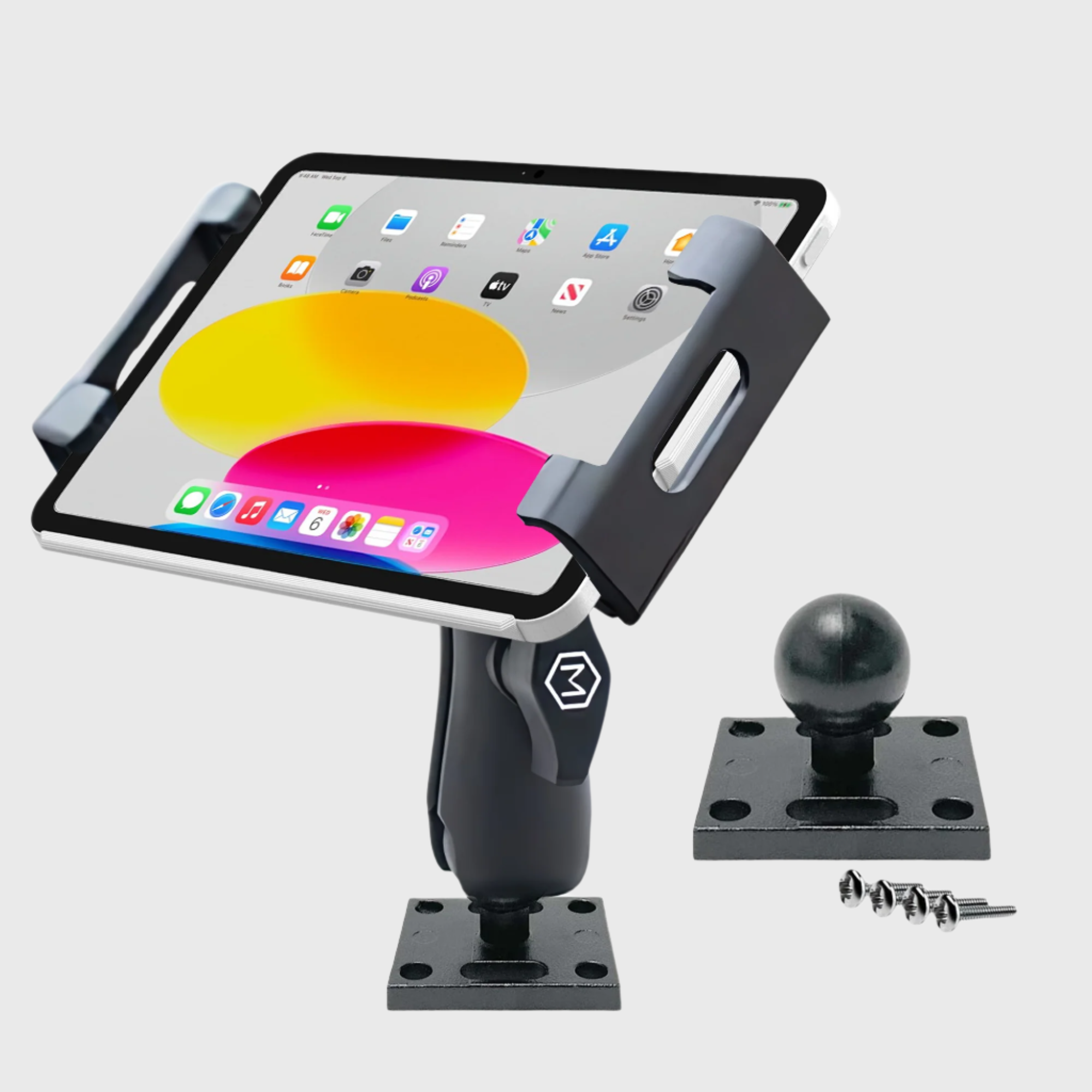
An iPad mount should keep your screen steady, visible, and secure: not shaking over every bump or slowly sagging out of position.
If your tablet moves while driving, the problem is usually mechanical. The iPad is heavier and larger than a phone, so weak suction, flexible vents, loose joints, and undersized arms become much more noticeable. A small amount of movement at the base can become significant wobble at the screen.
The solution is to match the mount to the tablet, the vehicle, and the demands of your daily route. Here is why iPad mounts wobble and how to create a more stable setup.
Why iPad Mounts Wobble
The Tablet Is Heavier Than the Mount Was Designed For
Many compact holders are designed primarily for phones. An iPad or full-size tablet places more weight and leverage on the arm, cradle, and ball joint.
When the arm is extended, the tablet sits farther from the mounting point. This creates a cantilever effect: road vibration at the base is amplified at the screen. The result is a shaking display, a cradle that slowly tilts downward, or an arm that cannot hold its position.
The fix: Choose a holder specifically designed for tablets. A heavy-duty cradle with strong adjustment points provides better support for larger devices, including iPads in protective cases.
Weak Suction Cups Lose Their Rigidity
Suction mounts depend on a clean, smooth surface and a flexible cup that can maintain a tight seal. Dust, oil, textured dashboards, heat, ultraviolet exposure, and age can all weaken that seal.
A suction cup may remain attached while still allowing the mount to rock. That movement transfers directly to the arm and tablet. If the cup is installed on a curved or soft dashboard, the surface itself can also flex under load.
The fix: Clean the mounting surface and suction cup thoroughly before installation. Use the stiffest smooth surface available, keep the arm as short as practical, and replace suction components that have hardened or lost their grip.
For larger tablets, a multi-suction design distributes the load more effectively. Mighty Mount’s Heavy-Duty Triple Suction Tablet Mount uses three 80 mm suction bases, a screw-based connection, and an adjustable dual-ball arm. It supports devices from approximately 6.25 to 13 inches and provides 360-degree rotation for portrait or landscape viewing.

Common Sources of Wobble
Sagging Ball Joints and Loose Collars
Ball joints make it easy to tilt and rotate an iPad, but they also become a weak point when they are undersized, loosely tightened, or made from low-quality plastic.
A loose collar allows the ball to shift under the tablet’s weight. Over time, repeated movement can reduce tension and cause the holder to sag. The mount may appear secure when stationary but move as soon as the vehicle is in motion.
The fix: Tighten every adjustment point, including ball-joint collars, arm locks, and cradle screws. Set the viewing angle before driving and avoid leaving the arm fully extended.
If the joint still moves after tightening, the hardware may not be appropriate for the tablet’s weight. A more substantial joint and a reinforced arm are better long-term solutions.
Mighty Mount’s proprietary 16 mm modular ball-joint ecosystem is designed to provide a precise connection between compatible bases, arms, and holders. The modular design also lets you move a device between mounting points without replacing the entire system: useful for drivers who operate more than one vehicle.
Cheap Plastic Flexes Under Load
Thin plastic arms and soft connection points can flex even when all the screws are tight. That flexibility is especially visible with a large iPad because the screen makes small movements easy to notice.
Plastic can also deform after repeated exposure to vibration and temperature changes. Once a cradle or joint loses its original shape, tightening it further will not fully restore stability.
The fix: Look for reinforced construction, strong locking points, and a tablet cradle with enough structural support for the device. The goal is not simply to hold the iPad in place while parked. The mount should maintain its position during daily driving, frequent adjustments, and demanding road conditions.
The Arm Is Too Long or Too Flexible
A long arm improves reach, but it also increases leverage. Every additional extension creates more opportunity for movement.
This is why an iPad may stay relatively steady when the arm is compact but wobble significantly when it is pulled toward the driver or passenger. Flexible gooseneck designs can make the problem worse by oscillating under the tablet’s weight.
The fix: Mount the base as close as possible to the desired viewing position. Keep the arm short, choose a rigid construction, and avoid unnecessary extension. Position the iPad so it remains easy to view without placing excessive strain on the joint.
Why Vent Mounts Often Shake
Air vents are convenient mounting locations for phones, but they are not always suitable for an iPad. Vent louvers are designed to move, and many are supported by lightweight internal mechanisms. A large tablet can cause the vent to flex, rotate, or gradually move downward.
The mount may be secure to the vent while the vent itself continues to vibrate. This creates movement that tightening the holder cannot solve.
The fix: Use a firm dashboard, windshield, console, or hard-mounted base when the tablet needs to remain steady. If you choose a vent location, use it only when the vent structure can support the tablet and the mount is designed for that load.
For delivery drivers, technicians, and fleet operators, a vent-mounted iPad can also take up valuable airflow and may be less consistent across different vehicle models. Standardizing a more robust mounting point helps create the same dependable setup across a fleet.
When You Need a Heavy-Duty iPad Cradle
A heavy-duty cradle is the right choice when you use:
- A full-size iPad or tablet
- A device inside a protective case
- An iPad for navigation, dispatch, ELD, or telematics
- A vehicle that travels over uneven roads
- A mount that must remain stable for hours each day
- A fleet setup that needs repeatable, reliable installation
The cradle should grip the device securely without blocking essential controls or ports. It should also allow practical adjustments, including portrait-to-landscape rotation, while maintaining a firm lock.
Mighty Mount’s heavy-duty tablet solutions are designed for iPads, Samsung tablets, and other devices in the approximately 6.25-to-13-inch range. The adjustable grip supports different tablet sizes and many protective cases, helping reduce movement inside the holder.

When an AMPS Drill Base Is the Better Solution
A suction mount can be practical when you need a removable installation. However, a permanent or semi-permanent setup is often the better choice for commercial vehicles, trucks, work vans, RVs, and high-vibration environments.
An AMPS drill base attaches to a sturdy flat surface using the industry-standard four-hole AMPS pattern. Instead of relying on suction, a drilled base transfers the load directly into the mounting surface. This creates a more rigid foundation and reduces rocking at the base.
Choose an AMPS drill base when:
- Your iPad mount must stay installed
- Drivers use the tablet throughout every shift
- The vehicle encounters frequent vibration or rough roads
- You are outfitting multiple fleet vehicles
- A suction or vent base continues to move
- You need a dependable mounting point for a work device
The Mighty Mount AMPS Drill Base iPad & Tablet Holder combines a permanent drill-base installation with a heavy-duty tablet holder, adjustable viewing angles, strong grip adjustment, and 360-degree rotation. It is designed for work vehicles, RVs, command centers, and other locations where the tablet needs to remain secure and accessible.

How to Stop Your iPad Mount From Wobbling
Use this quick stability checklist:
- Select the correct holder: Use a tablet-rated cradle rather than a phone-only mount.
- Inspect the base: Replace degraded suction cups or move away from flexible surfaces.
- Clean before installing: Remove dust, oils, and residue from suction surfaces.
- Shorten the arm: Keep the tablet close to the base whenever possible.
- Tighten every joint: Check collars, hinges, screws, and locking points.
- Avoid weak vents: Move to a firm dashboard, console, or permanent base.
- Use an AMPS drill base: Choose a hard-mounted solution for demanding daily use.
- Check the viewing position: Keep the screen visible without obstructing the windshield, controls, or safe operation of the vehicle.
Choose Stability That Matches Your Route
A wobbling iPad mount is rarely caused by the tablet alone. It is usually the result of a mismatch between the device weight, mounting location, arm length, joint design, and base attachment.
For occasional use on smooth surfaces, a properly installed heavy-duty suction mount may provide the flexibility you need. For delivery routes, trucking, field service, and fleet operations, a heavy-duty cradle paired with a robust base offers greater confidence. When maximum stability matters, an AMPS drill base provides the strongest foundation.
Mighty Mount engineers mounting solutions around real driving conditions: not just showroom appearances. With premium materials, secure cradles, durable bases, and a modular 16 mm ball-joint system, you can create a cleaner, more reliable setup for your next destination.
View the Mighty Mount AMPS and drill-base collection, choose your tablet holder, and build a setup that stays where you put it.
Frequently Asked Questions
Why does my iPad mount wobble but my phone mount does not?
An iPad is larger and heavier than most phones. It creates more leverage on the arm and ball joint, making flex, looseness, and vibration more visible.
Is a suction cup strong enough for an iPad?
A heavy-duty suction design can work on a clean, smooth, rigid surface. For rough roads or continuous commercial use, a triple-suction mount or AMPS drill base provides a more secure foundation.
Are vent mounts suitable for iPads?
Vent mounts can work in some vehicles, but flexible louvers often amplify vibration under a tablet’s weight. A firm dashboard, console, windshield, or drilled mounting surface is generally better for stability.
What is the most stable iPad car mount?
For the highest level of stability, use a tablet-rated heavy-duty cradle attached to a rigid AMPS drill base. Keep the arm compact and tighten all adjustment points before driving.
Can I use an iPad in a protective case?
Many Mighty Mount tablet holders are designed to accommodate iPads and tablets with protective cases. Check the product specifications and holder range before ordering to confirm compatibility.